Testing Cloud Resources Before You Pay for Them
Why emulating AWS locally with LocalStack (or anything like it) saves you from the fix-deploy-fix-deploy loop, and where it stops helping.
When we start building a feature in our local environment, we always start from the beginning (well, obviously 😄): read what the business rule asks for, understand what it actually requires, figure out how to apply that technically at a high level, refine the proposal for the solution we're working on, split it into tasks, and only then start implementing.
At some point those solutions will need integration points to bring in the value that feature x actually needs. So we start implementing the database, our producers, our consumers — and inside all of that, we need to validate the whole implementation. But how do you test any of this locally when those services all live in the cloud? How do you test an event-driven flow using AWS Lambda with producers and consumers? How do you simulate creating your GSIs in DynamoDB?
Maybe not these exact questions — yours will look different depending on what you're building. But if you're a reasonable person, at some point you stop and ask yourself how you're actually going to validate any of this haha. That's the real question, and it's the one that leads us to the solution.
The question isn't "will it work", it's "how will it work"
This part matters. It's not only about knowing whether something works — it's about knowing how it works. Because it's one thing to set the configuration of those resources, or to know how they're going to be set, and then decide to push everything to the cloud and test it there.
Following that flow gets expensive:
- Expensive in money, because you're burning CI/CD minutes and real resources every time you provision them.
- Expensive in time, because you find out it broke in the cloud, then open another PR with a fix, which will probably need another fix, and another, until you reach the final solution.
- Expensive in opportunity, because all that time could have been spent shipping other features.
So today we have solutions like LocalStack and others that let us emulate these environments locally and test everything up front — before we even try to push those resources to the cloud and get stuck in an infinite loop of fix on top of fix.
What the emulated slice actually looks like
The part that clicks for most people is that you're not writing a mock. You're running the real service protocol against a local implementation of it, so your own code barely knows the difference.
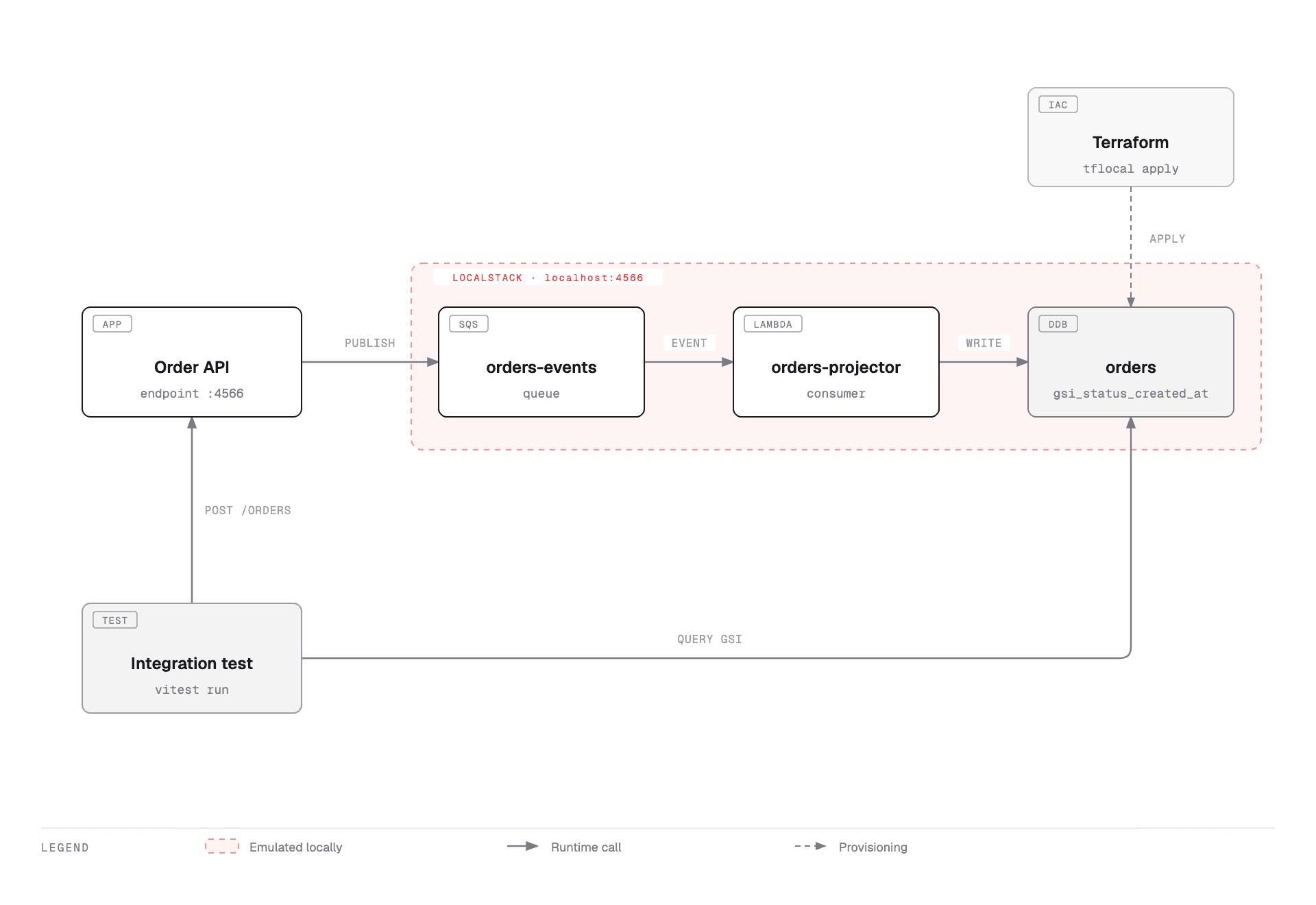
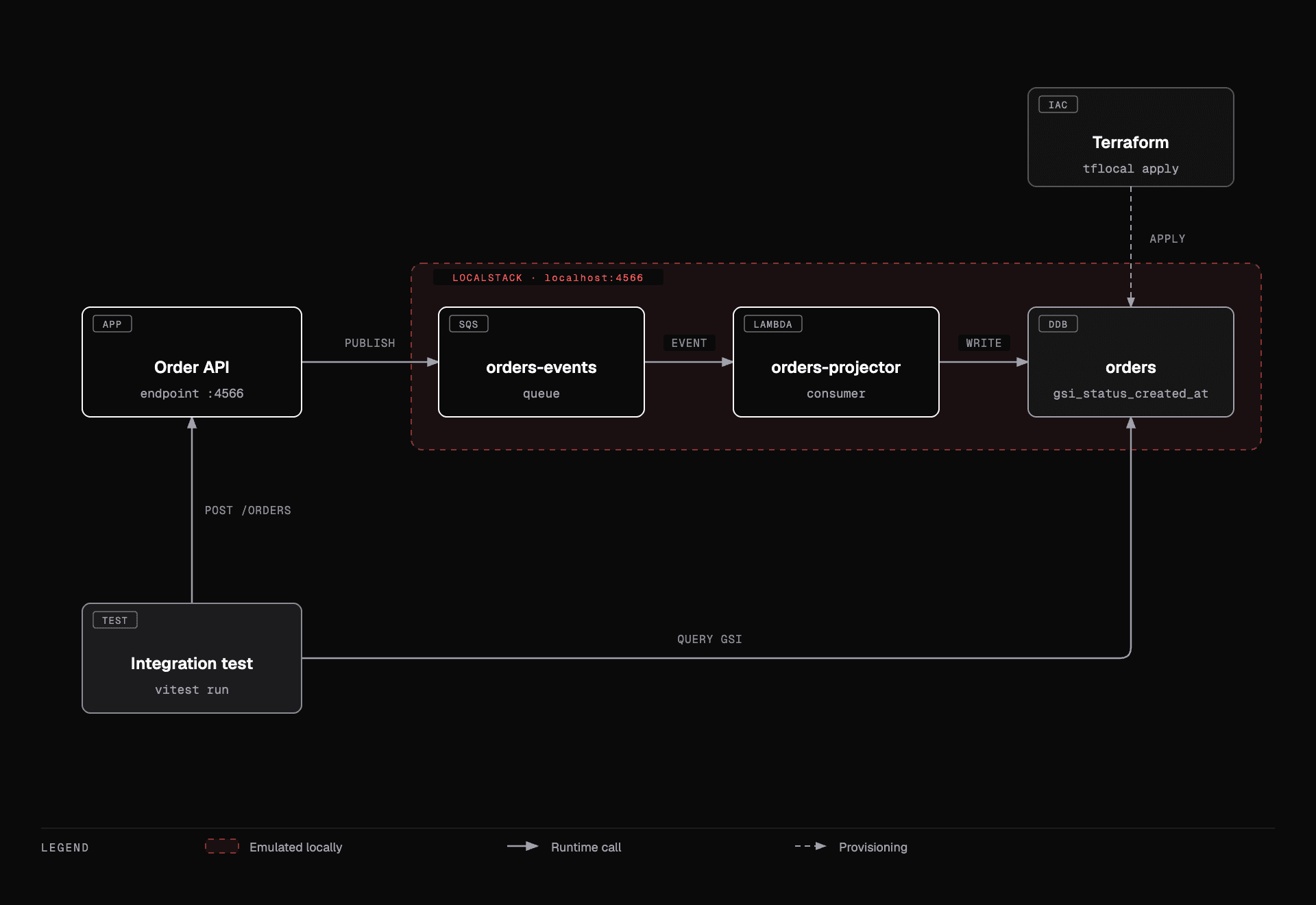
A minimal setup looks like this:
services:
  localstack:
    image: localstack/localstack:4
    ports:
      - "4566:4566"
    environment:
      SERVICES: dynamodb,sqs,lambda
    volumes:
      - "/var/run/docker.sock:/var/run/docker.sock"
And on the application side, modern AWS SDKs read AWS_ENDPOINT_URL natively, so in most cases there is no code change at all:
export AWS_ENDPOINT_URL=http://localhost:4566If you'd rather be explicit about it — or you're on an older SDK — you can still set it per client:
import { DynamoDBClient } from "@aws-sdk/client-dynamodb";

const client = new DynamoDBClient({
  region: "us-east-1",
  ...(process.env.AWS_ENDPOINT_URL && {
    endpoint: process.env.AWS_ENDPOINT_URL,
  }),
});
That's the whole trick. Same SDK, same calls, same Terraform — different endpoint.
A concrete example: the GSI that wasn't there
Let's walk through it. Say you need a new GSI so you can do indexed lookups. You go to your code, write the query against the index you need, check it, and it looks correct. Then you go to the infra repo, add the new GSI in Terraform, check that too, and ship it.
resource "aws_dynamodb_table" "orders" {
  name         = "orders"
  billing_mode = "PAY_PER_REQUEST"
  hash_key     = "pk"
  range_key    = "sk"

  attribute {
    name = "pk"
    type = "S"
  }

  attribute {
    name = "status"
    type = "S"
  }

  attribute {
    name = "created_at"
    type = "S"
  }

  global_secondary_index {
    name            = "gsi_status_created_at"
    hash_key        = "status"
    range_key       = "created_at"
    projection_type = "ALL"
  }
}
Infra deploy goes green. Then you ship your code with the query:
import { QueryCommand } from "@aws-sdk/client-dynamodb";

const result = await client.send(
  new QueryCommand({
    TableName: "orders",
    IndexName: "gsi-status-created-at",
    KeyConditionExpression: "#status = :status",
    ExpressionAttributeNames: { "#status": "status" },
    ExpressionAttributeValues: { ":status": { S: "PENDING" } },
  }),
);
Deploy finishes, you go test it, and BOOM:
ValidationException: The table does not have the specified index: gsi-status-created-at
    at throwDefaultError (@smithy/smithy-client)
    $metadata: { httpStatusCode: 400, ... }
Hyphens in the code, underscores in Terraform. Now you have to open a new PR just to fix the query so it points at the index that was already deployed — and only then can you actually test and confirm the fix worked.
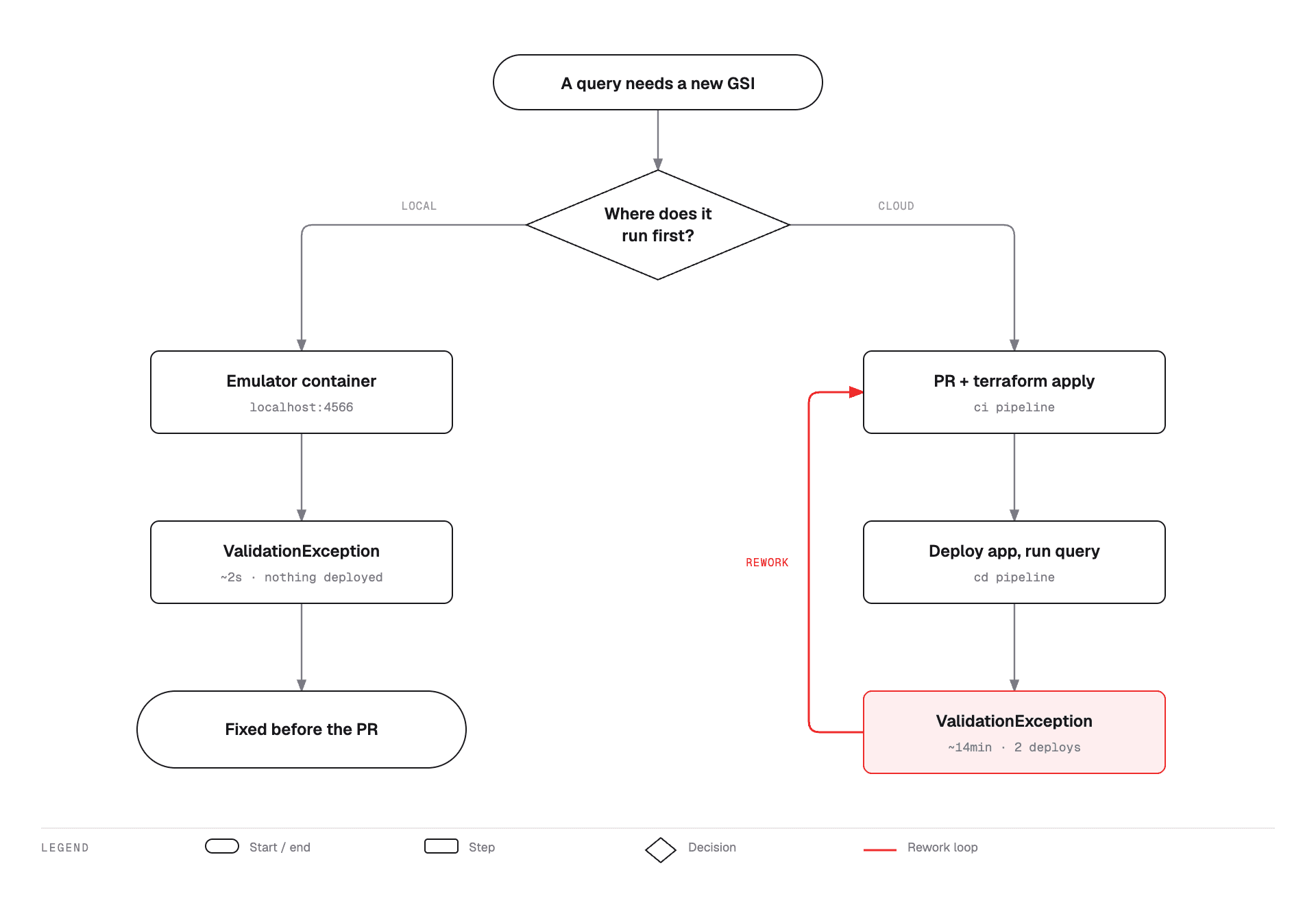
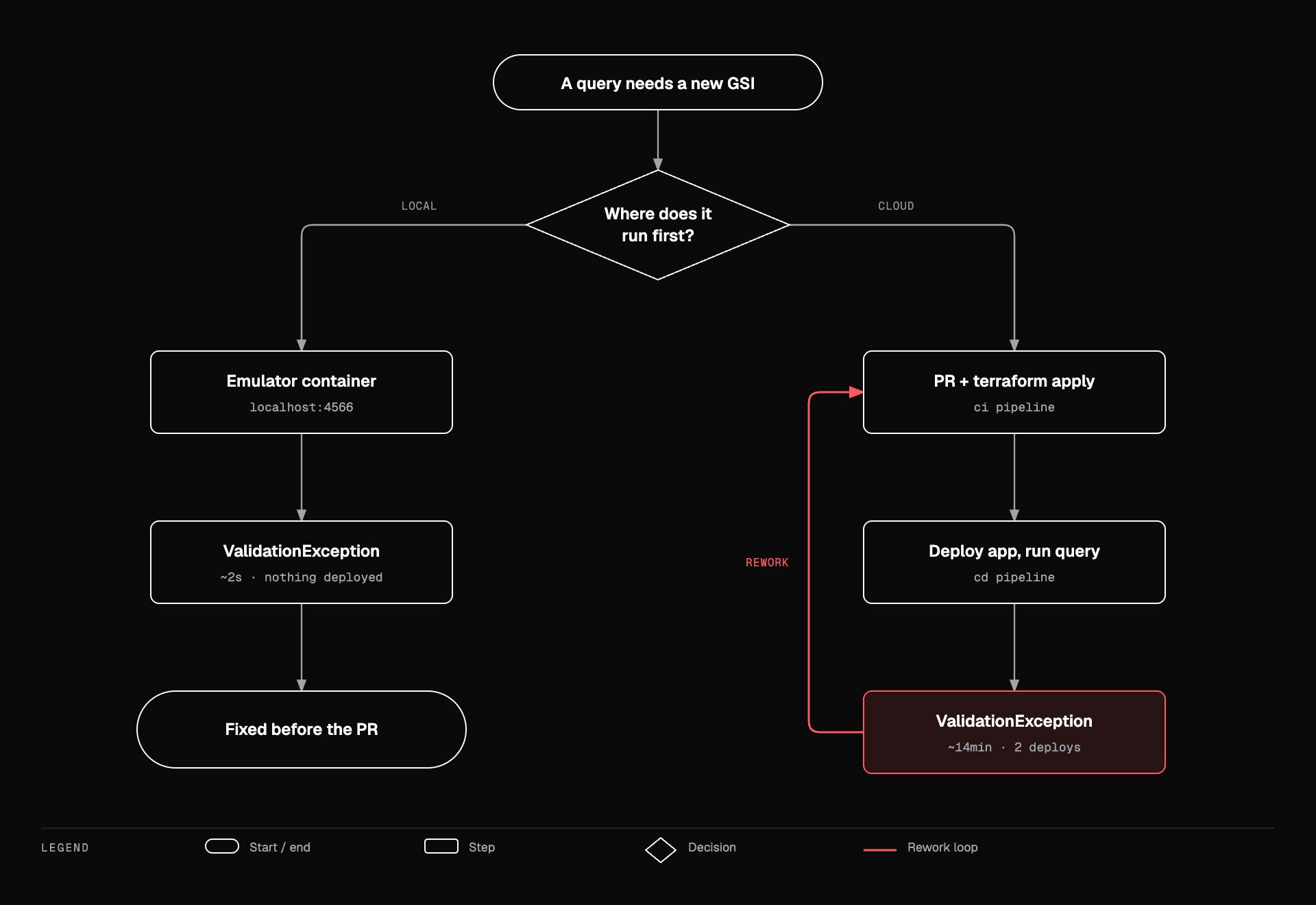
There's a second thing worth knowing here, and it bit me before I understood it: a GSI is not queryable the instant terraform apply returns. When you add an index to an existing table, DynamoDB has to backfill it — the index goes CREATING before it goes ACTIVE. So even with a perfectly correct index name, deploy-then-test can fail for a completely unrelated reason, and you'll spend a while blaming your query.
And honestly, the typo isn't even the scary case. The scary case is silent. Imagine the Terraform said:
  global_secondary_index {
    name            = "gsi_status_created_at"
    hash_key        = "status"
    range_key       = "created_at"
    projection_type = "KEYS_ONLY"
  }
The name matches. The query runs. No error. You just get items back with none of the attributes your code expected, and whatever you build from them is quietly wrong. Loud errors are cheap. That one isn't — and it's exactly the kind of thing a local integration test catches on the first run.
What it won't catch
Simulating resources locally and testing against them doesn't guarantee you won't hit implementation errors in the cloud. But it definitely reduces them, gives you more predictability, and lets you be more confident in what you're shipping.
Being honest about the limits is part of the value, though:
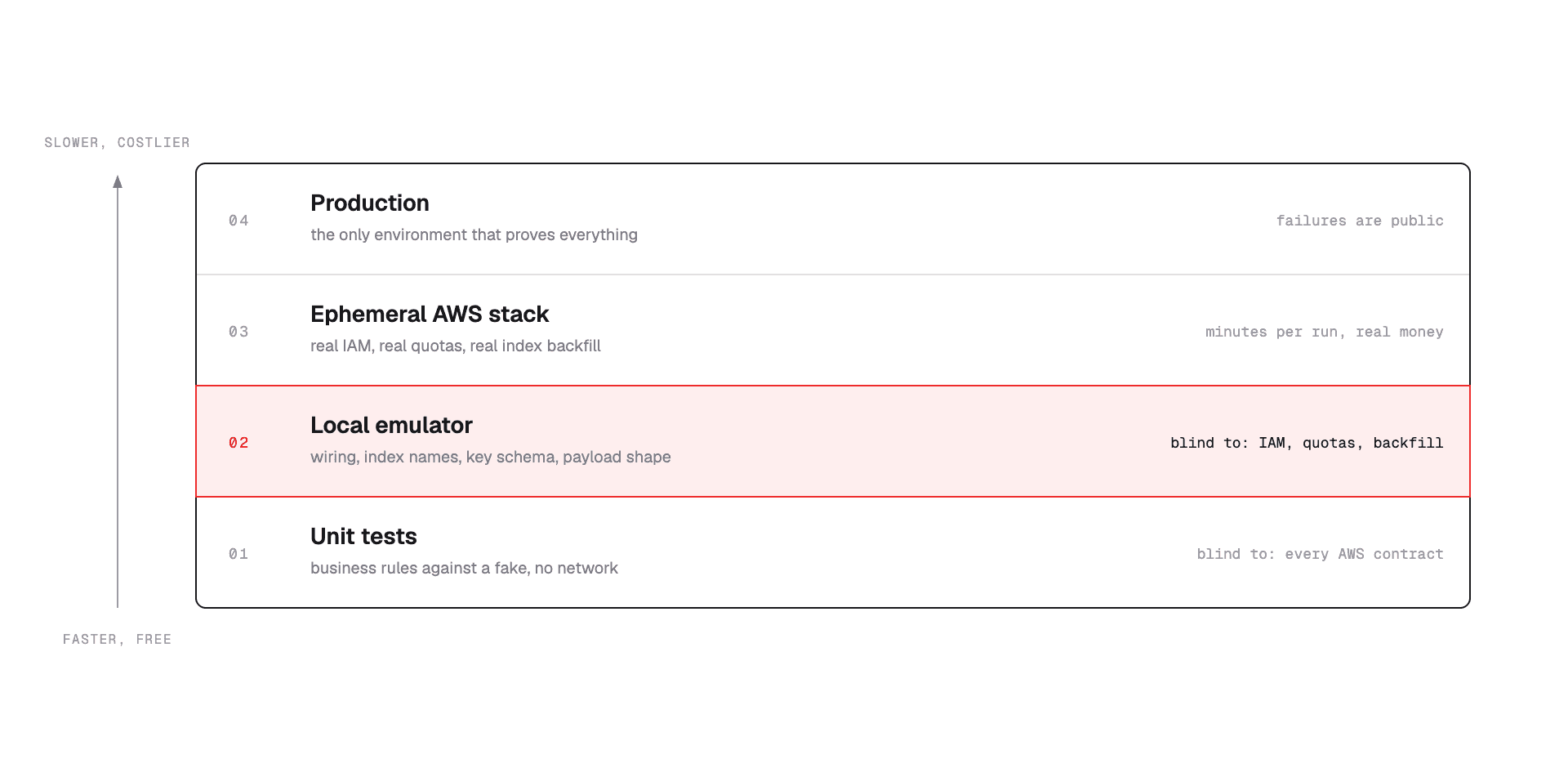
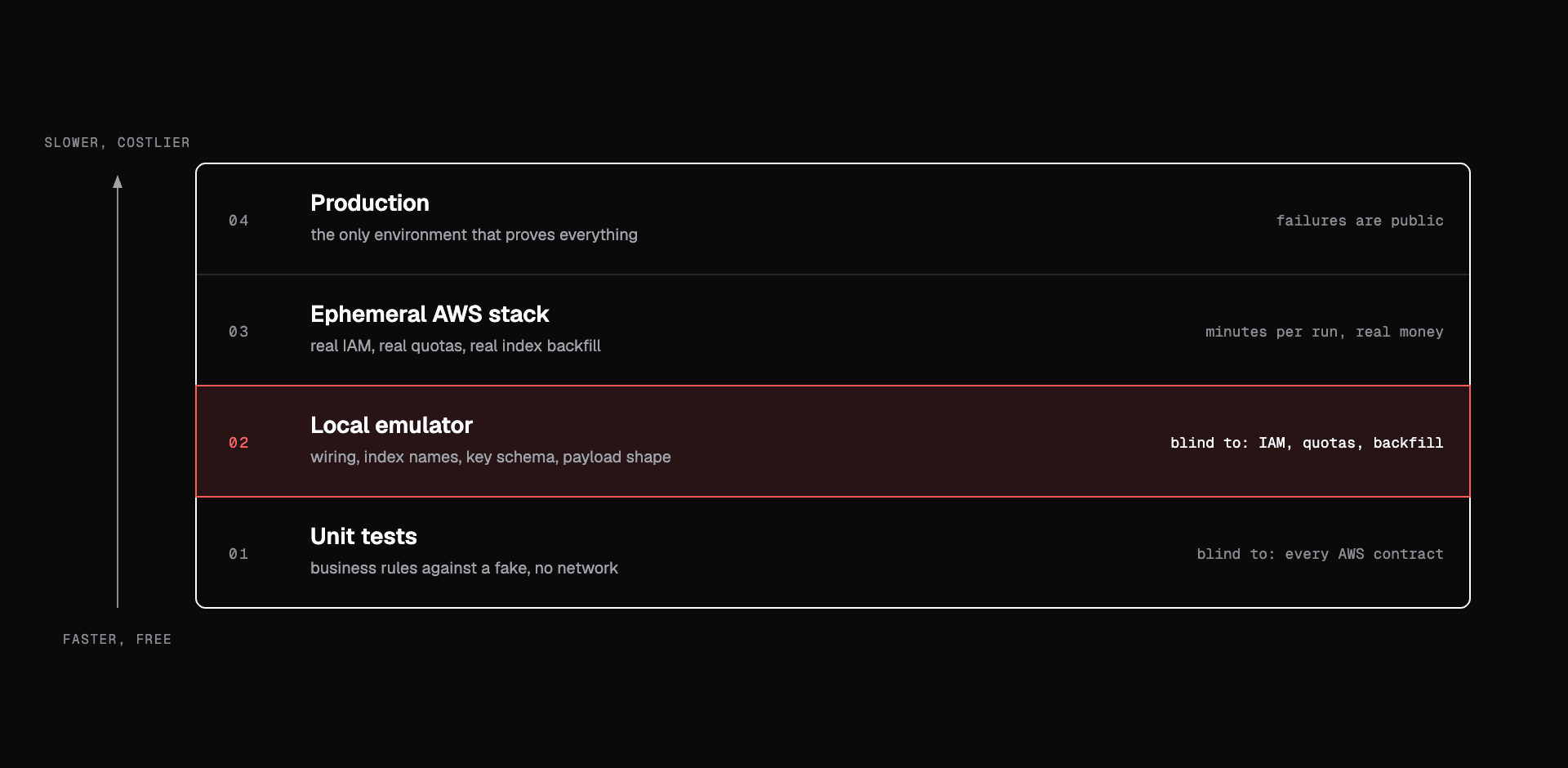
The main one is permissions. Locally almost everything is allowed, so your happy path sails through — and then production tells you no. Same idea with limits and timing: the emulator is faster and more forgiving than the real service, which is exactly what makes it pleasant to develop against.
So, roughly: the shape of things — how it's wired, what it's called, what it carries — you can trust locally. Permissions and limits still need a real account.
It's not only LocalStack
The same reasoning applies to any resource you need to integrate. It's always worth checking whether your local cloud simulation tool covers the resources you actually need.
LocalStack is the obvious example — it covers SQS, SNS, DynamoDB, S3, Lambda and plenty more, which is already enough for most cases. Some resources only show up in the paid plans, as you'd expect, and their plans page has a simple comparison if you want to check before committing to it.
And of course, LocalStack isn't the only one:
- DynamoDB Local — AWS's own, free, runs as a JAR or a container.
- MinIO for S3, ElasticMQ for SQS.
- Testcontainers to start and wire any of the above from inside your test suite.
- Azurite for Azure, fake-gcs-server for GCP.
There are plenty of alternatives out there. You just need to be a little curious and have a bit of willingness, and you'll find something that fits :)
Wrapping up
That's it, folks. This one was more of a "tip" post, sharing some of the benefits I've collected from doing this. I think there's room to bring something more technical here in future posts — an actual working setup, end to end.
Big hug, and see you in the next one 🚀