Safe Database Changes
Expand and contract, the locks DDL really takes, batched backfills, and shipping schema changes to a live system without downtime.
Table of contents
A schema change is a deploy that cannot be rolled back by redeploying the previous image. That single asymmetry is what makes migrations their own discipline: the code can go back, the data usually cannot.
Everything below follows from one rule.
The rule: at every point in the rollout, the previous version of the application must still be correct against the current schema. If that holds, a rollback is just a code rollback. If it does not, a rollback needs a schema change, and you will be writing it under pressure.
Expand and contract
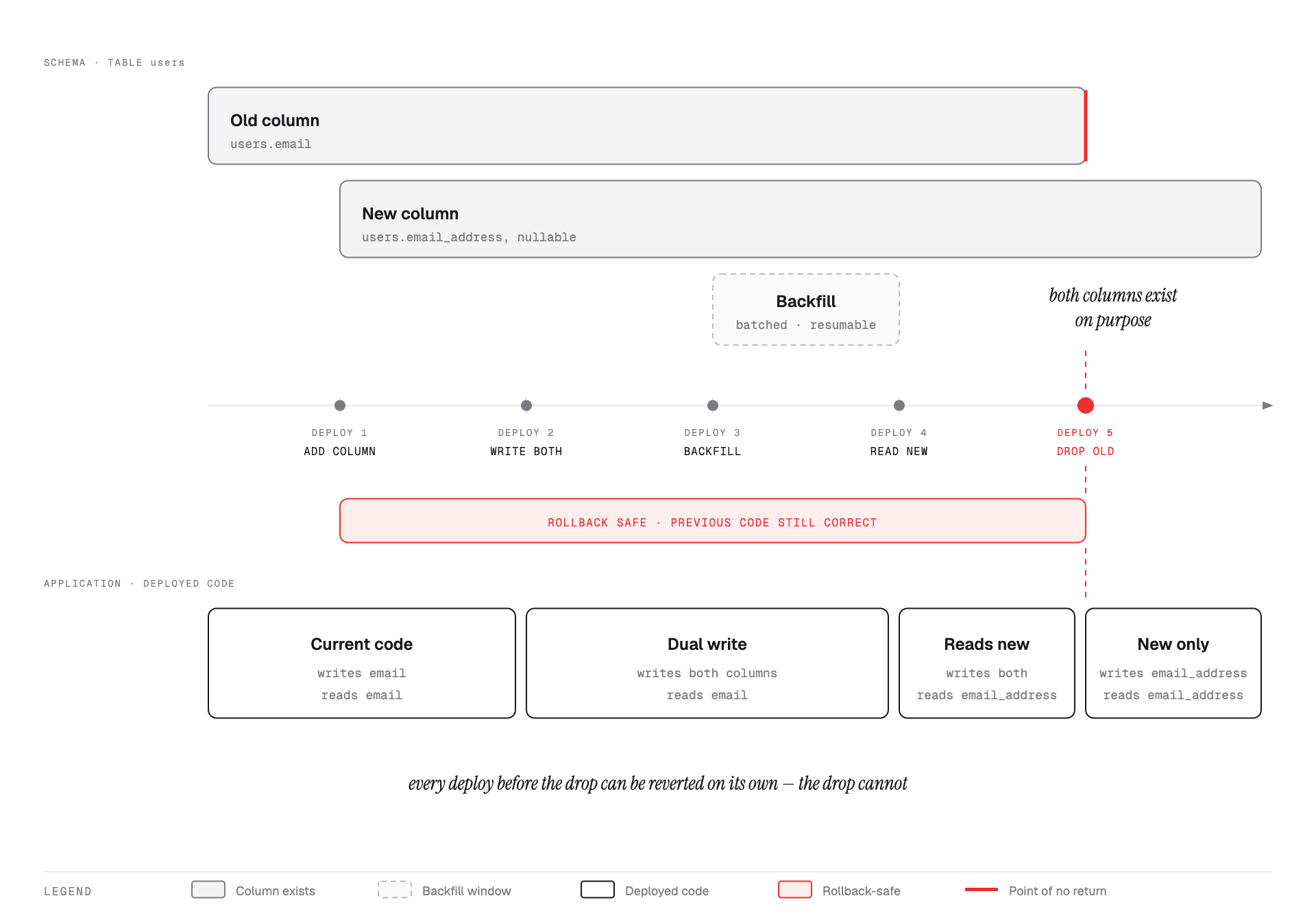
Renaming users.email to users.email_address. The tempting version is one migration and
one deploy, and it is an outage: between the migration running and the new code being live
on every instance, the old code is querying a column that no longer exists.
The safe version is five steps, each shippable on its own:
1. Expand the schema. Add the new column, nullable, no default that rewrites the table.
ALTER TABLE users ADD COLUMN email_address text;Old code does not know it exists and keeps working.
2. Write both, read the old.
await db.user.update({
  where: { id },
  data: { email: value, emailAddress: value },
});
Now every new or updated row has both. Rolling back to step 1's code is still correct.
3. Backfill the existing rows. In batches — see below. After this, both columns agree for every row.
4. Read the new, keep writing both. The switch that matters, and it is a pure code deploy with no schema change. If it goes wrong, you redeploy step 2 and the data is fine because the old column was never abandoned.
5. Contract. Stop writing the old column, deploy, wait, then drop it.
ALTER TABLE users DROP COLUMN email;This is the point of no return, and it belongs in its own deploy, days after step 4 — not in the same pull request. The gap exists so that "we need to roll back to last week's build" stays possible.
The same shape applies to splitting a column, changing a type, moving a field to another table, and renaming an API field. Learn it once.
What DDL actually locks
DDL and DML
Two categories of SQL statement. The distinction is the entire reason migrations are dangerous and ordinary traffic is not.
DML — Data Manipulation Language. Statements that change the rows: INSERT,
UPDATE, DELETE. SELECT reads them. This is what your application runs, continuously.
DDL — Data Definition Language. Statements that change the shape of the database:
CREATE TABLE, ALTER TABLE, DROP TABLE, TRUNCATE, CREATE INDEX. This is what a
migration runs, rarely, and usually while the application is still running DML.
Both target the same table. PostgreSQL arbitrates between them with table-level locks.
The locks you never asked for
Every statement takes a lock on every table it touches, automatically. You do not write
LOCK TABLE — the kind of statement decides the mode. A lock mode is a declaration of what
other statements may do while yours is running.
PostgreSQL has eight table lock modes. Six of them show up in normal work:
| Mode | Taken automatically by | What it is saying |
|---|---|---|
ACCESS SHARE | SELECT | "I am reading. Do not change the table's shape." |
ROW SHARE | SELECT ... FOR UPDATE | "I am reading rows I intend to write." |
ROW EXCLUSIVE | INSERT, UPDATE, DELETE | "I am changing rows — not the shape." |
SHARE UPDATE EXCLUSIVE | VACUUM, ANALYZE, CREATE INDEX CONCURRENTLY, VALIDATE CONSTRAINT | "Maintenance in progress. Traffic can carry on." |
SHARE | CREATE INDEX, without CONCURRENTLY | "Reads are fine. Nobody write." |
ACCESS EXCLUSIVE | most ALTER TABLE, DROP TABLE, TRUNCATE, REINDEX, VACUUM FULL | "Nobody touches this table at all." |
The names are bad. Decode them once and they stop being noise:
- ACCESS in the name means the mode cares about reading. Only the two
ACCESSmodes interact with a plainSELECT— which is whyACCESS EXCLUSIVEis the only mode that can block one. - ROW means the statement works on rows, so at the table level it is deliberately
permissive. Contention between two
UPDATEs is handled by row locks underneath, not here. - EXCLUSIVE means it excludes the matching
SHAREmode — not that it excludes everything.ROW EXCLUSIVEis a mild lock despite the frightening name.
Which pairs actually conflict
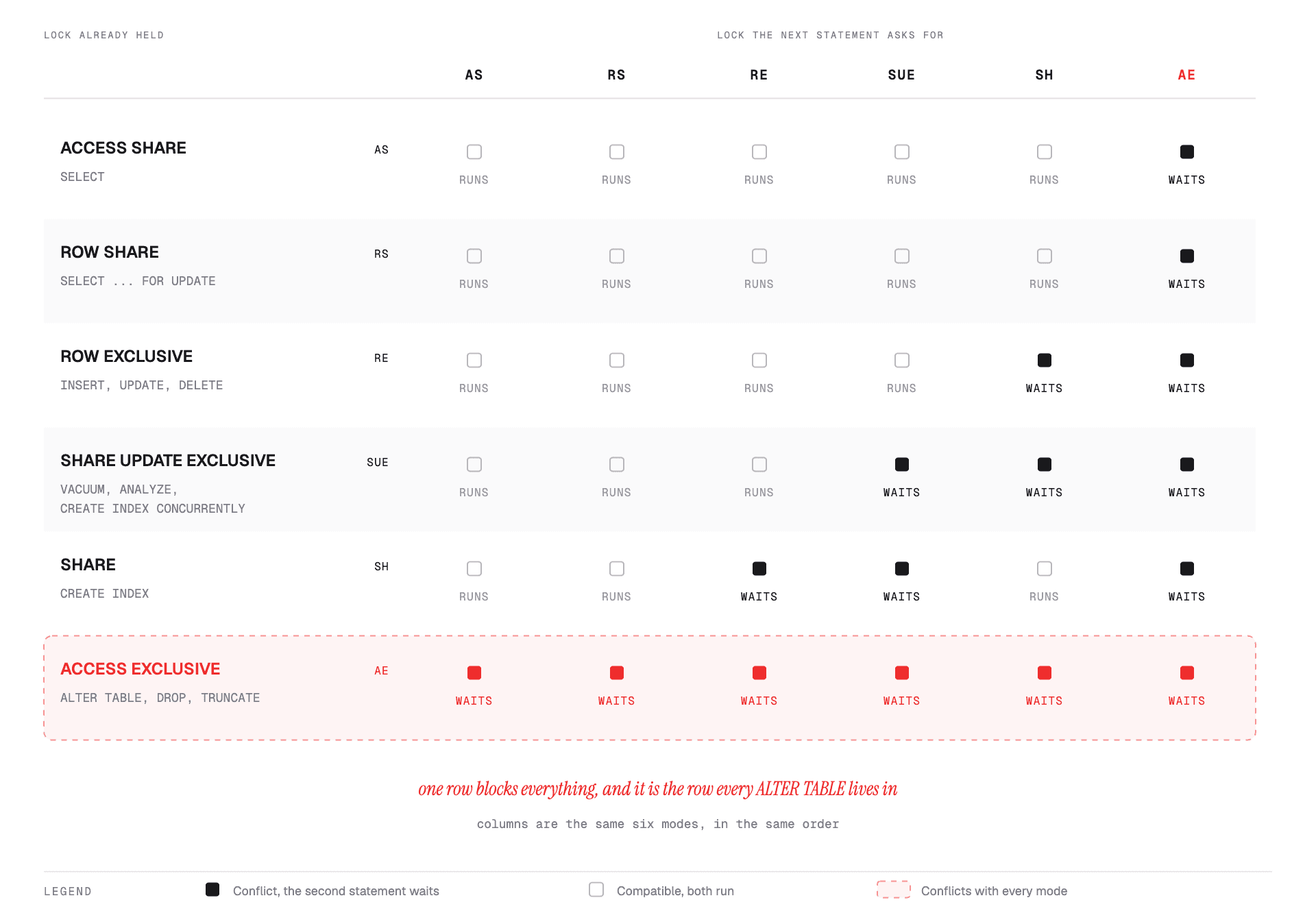
Two readings carry most of the value:
ROW EXCLUSIVE does not conflict with itself. Two UPDATEs on the same table never
block each other at the table level. Different rows, no contention at all; same row, a row
lock sorts it out. This is why normal write traffic scales and why INSERT never waits for
another INSERT.
ACCESS EXCLUSIVE conflicts with all six, including ACCESS SHARE. It is the only mode
that can stop a plain SELECT, and it is the mode almost every ALTER TABLE takes.
What that means per operation
| You are doing | Lock you take | Who you block |
|---|---|---|
| Serving reads | ACCESS SHARE | Only a migration |
| Serving writes | ROW EXCLUSIVE | A plain CREATE INDEX, and a migration |
CREATE INDEX | SHARE | Every write. Reads continue |
CREATE INDEX CONCURRENTLY | SHARE UPDATE EXCLUSIVE | Nothing your application does |
VACUUM, ANALYZE | SHARE UPDATE EXCLUSIVE | Nothing your application does |
VALIDATE CONSTRAINT | SHARE UPDATE EXCLUSIVE | Nothing your application does |
ALTER TABLE ... ADD COLUMN | ACCESS EXCLUSIVE | Everything, including SELECT |
DROP TABLE, TRUNCATE | ACCESS EXCLUSIVE | Everything, including SELECT |
That table is the whole argument for the cookbook below. Every "safe" form in it is a way
of doing the same work under SHARE UPDATE EXCLUSIVE instead of ACCESS EXCLUSIVE —
CONCURRENTLY for indexes, NOT VALID plus VALIDATE for constraints, expand/contract
for everything else.
Why a two-millisecond ALTER can take a table down
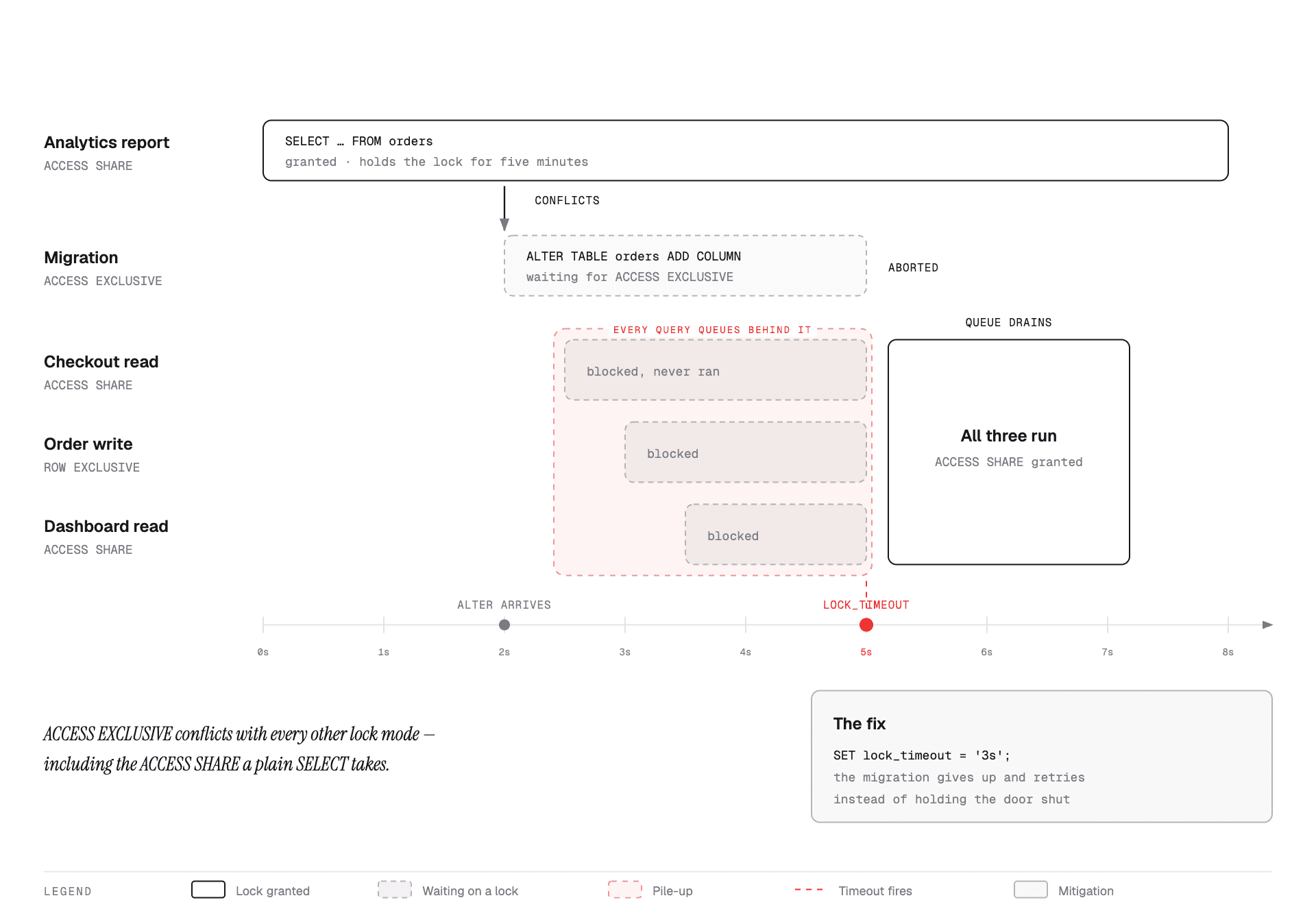
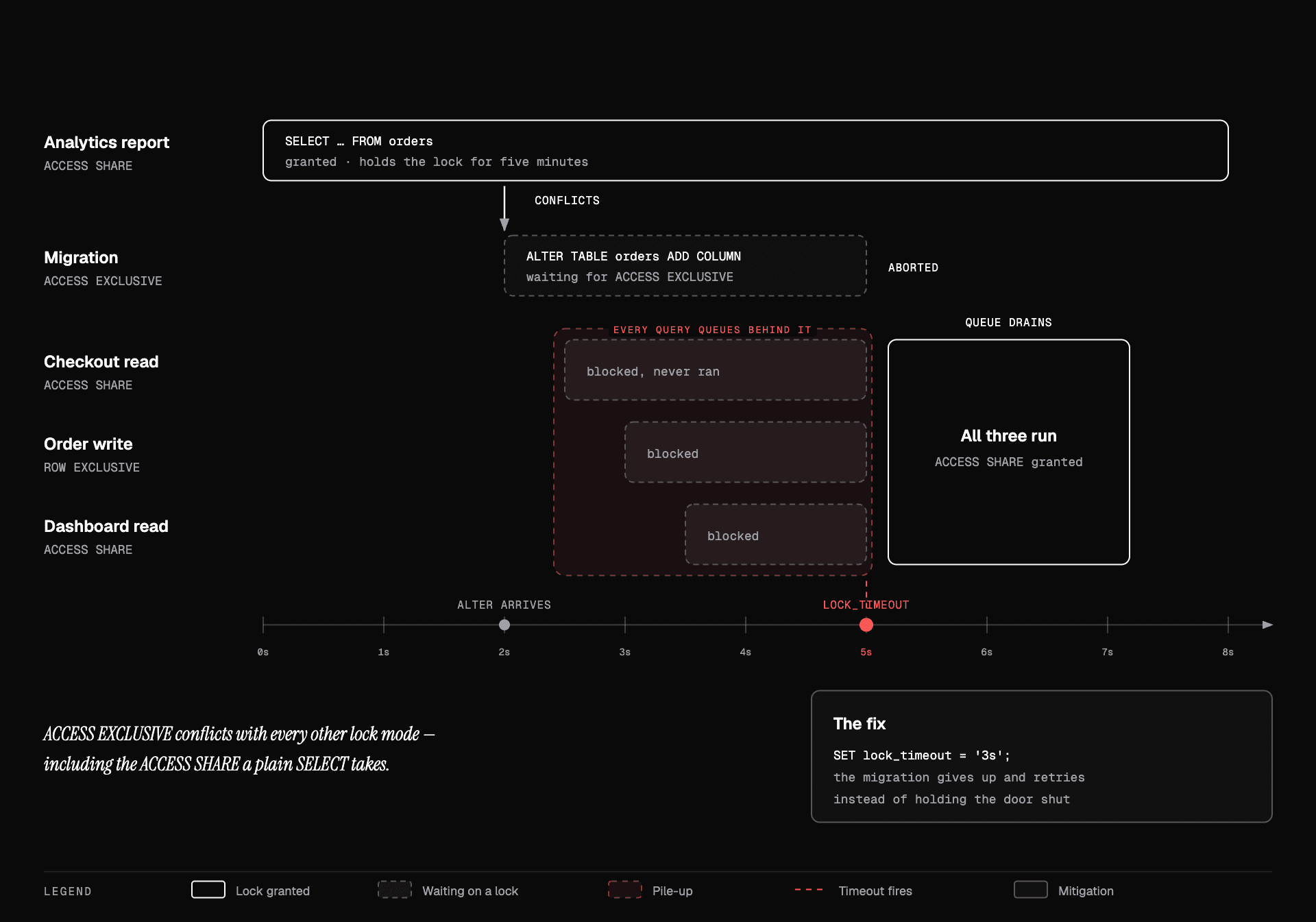
The failure mode people do not predict:
- A slow
SELECT— an analytics query, an export, a forgotten open transaction — holdsACCESS SHAREonorders. Perfectly normal. - Your
ALTER TABLE orders ADD COLUMN ...requestsACCESS EXCLUSIVE. It conflicts, so it waits. - Every query that arrives after it also waits — including plain
SELECTs that would have been perfectly compatible with the query already running. Lock requests are served in arrival order, and nothing overtakes the waitingALTER.
Step 3 is the part that surprises people. You might expect new SELECTs to slip past, since
ACCESS SHARE and ACCESS SHARE do not conflict — but the queue is FIFO, and they conflict
with the ALTER sitting in front of them. So the table goes dark for as long as one unrelated
slow query runs.
The ALTER itself would have finished in two milliseconds. The queue behind it is the
incident.
The mitigation is two settings
SET lock_timeout = '3s';
SET statement_timeout = '30s';

ALTER TABLE orders ADD COLUMN email_address text;
lock_timeout makes the migration give up rather than hold the door shut. Fail fast,
retry in a loop, and the worst case is a migration that takes a few attempts instead of an
incident. Every migration tool worth using lets you set this per session; if yours does not,
set it in the migration itself.
lock_timeout without a retry loop turns a hang into a failed deploy. Set both, and make
the retry backoff — the whole point is to keep attempting until you catch a quiet moment.
Operation cookbook
The forms that matter, safe version against the one that bites.
Adding a column
ALTER TABLE orders ADD COLUMN notes text;                       -- safe, metadata only
ALTER TABLE orders ADD COLUMN status text NOT NULL DEFAULT 'new'; -- safe on PG 11+
Since PostgreSQL 11, a non-volatile default is stored in the catalogue rather than written
to every row, so this is fast even on a huge table. On PostgreSQL 10 and earlier it rewrites
the whole table. A volatile default still rewrites — DEFAULT now() or
DEFAULT gen_random_uuid() are full rewrites on every existing row.
Adding NOT NULL to an existing column
The direct form scans the whole table under ACCESS EXCLUSIVE:
ALTER TABLE orders ALTER COLUMN email SET NOT NULL; -- full scan, hard lockThe safe path, in three steps:
ALTER TABLE orders ADD CONSTRAINT orders_email_nn
  CHECK (email IS NOT NULL) NOT VALID;               -- instant, no scan

ALTER TABLE orders VALIDATE CONSTRAINT orders_email_nn;  -- scans, weaker lock

ALTER TABLE orders ALTER COLUMN email SET NOT NULL;  -- PG 12+: uses the proven constraint
NOT VALID means "enforce from now on, do not check what is already there." VALIDATE
then does the scan under SHARE UPDATE EXCLUSIVE, which does not block reads or writes.
On PostgreSQL 12+ the final SET NOT NULL can lean on the validated constraint and skip its
own scan.
Adding an index
CREATE INDEX CONCURRENTLY orders_tenant_created
  ON orders (tenant_id, created_at);
CONCURRENTLY builds without blocking writes. Three consequences to state before someone
else does:
- It cannot run inside a transaction block. Many migration tools wrap everything in one by default; you have to opt out explicitly.
- It is roughly twice as slow, because it makes two passes.
- If it fails, it leaves an invalid index behind, which still costs write overhead while never being used for reads. Find and clean them up:
SELECT indexrelid::regclass
FROM pg_index WHERE NOT indisvalid;

DROP INDEX CONCURRENTLY orders_tenant_created;
DROP INDEX CONCURRENTLY exists too, and is the right form on a live table.
Adding a foreign key or check constraint
Same two-phase shape:
ALTER TABLE orders
  ADD CONSTRAINT orders_customer_fk
  FOREIGN KEY (customer_id) REFERENCES customers(id) NOT VALID;

ALTER TABLE orders VALIDATE CONSTRAINT orders_customer_fk;
The first is instant and enforces the rule for new rows. The second scans under a lock that lets traffic through. If validation fails, you have found pre-existing bad data — fix it, then validate again. The constraint is already protecting you from new violations while you clean up.
Changing a column type
ALTER TABLE ... ALTER COLUMN ... TYPE usually rewrites the table and every dependent
index, under ACCESS EXCLUSIVE. A few widening conversions are free (varchar(50) to
varchar(100) or to text); most are not, and int to bigint is a full rewrite on the
table everyone needs it on.
Do it as expand/contract: add a new column of the new type, dual-write, backfill in batches, switch reads, drop the old one. Slower to write, and it does not take the table offline.
Renaming or dropping
Never in the same deploy as the code change. Always expand/contract. A rename is a drop plus an add as far as the running application is concerned.
For a drop, there is a useful intermediate step:
ALTER TABLE orders ALTER COLUMN legacy_ref DROP NOT NULL;  -- let new writes omit it
-- deploy code that no longer writes it, wait a full rollback window, then:
ALTER TABLE orders DROP COLUMN legacy_ref;
Backfills
Never one statement:
UPDATE users SET email_address = email; -- locks every row, one huge transactionOn a large table this holds row locks for the duration, generates enormous WAL, blocks vacuum, and if it fails at 90% you have nothing.
Batch it, keyed on the primary key so it is resumable:
WITH batch AS (
  SELECT id FROM users
  WHERE email_address IS NULL
  ORDER BY id
  LIMIT 5000
  FOR UPDATE SKIP LOCKED
)
UPDATE users u
SET email_address = u.email
FROM batch
WHERE u.id = batch.id;
Run it in a loop until it affects zero rows, with a pause between batches. The properties that matter:
- Each batch is its own transaction. Locks are held for milliseconds.
- Resumable. The
IS NULLpredicate is the progress marker; a crash costs one batch. - Throttled. The sleep between batches gives autovacuum and replication room to keep up.
SKIP LOCKEDavoids fighting live traffic for the same rows.
Watch replication lag while it runs. A backfill that outruns your replicas turns a maintenance task into a read-availability incident.
Is this change safe? A decision path
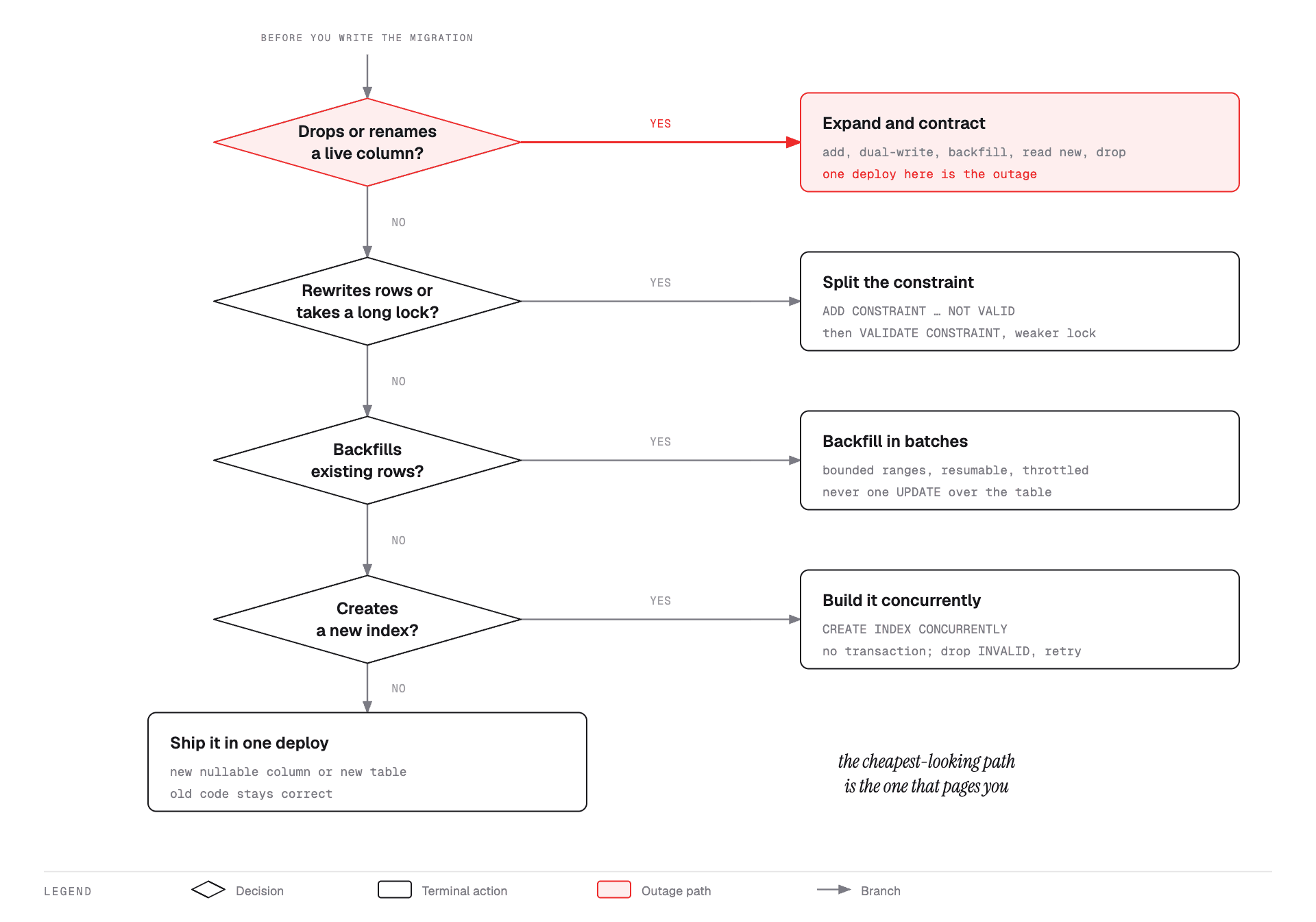
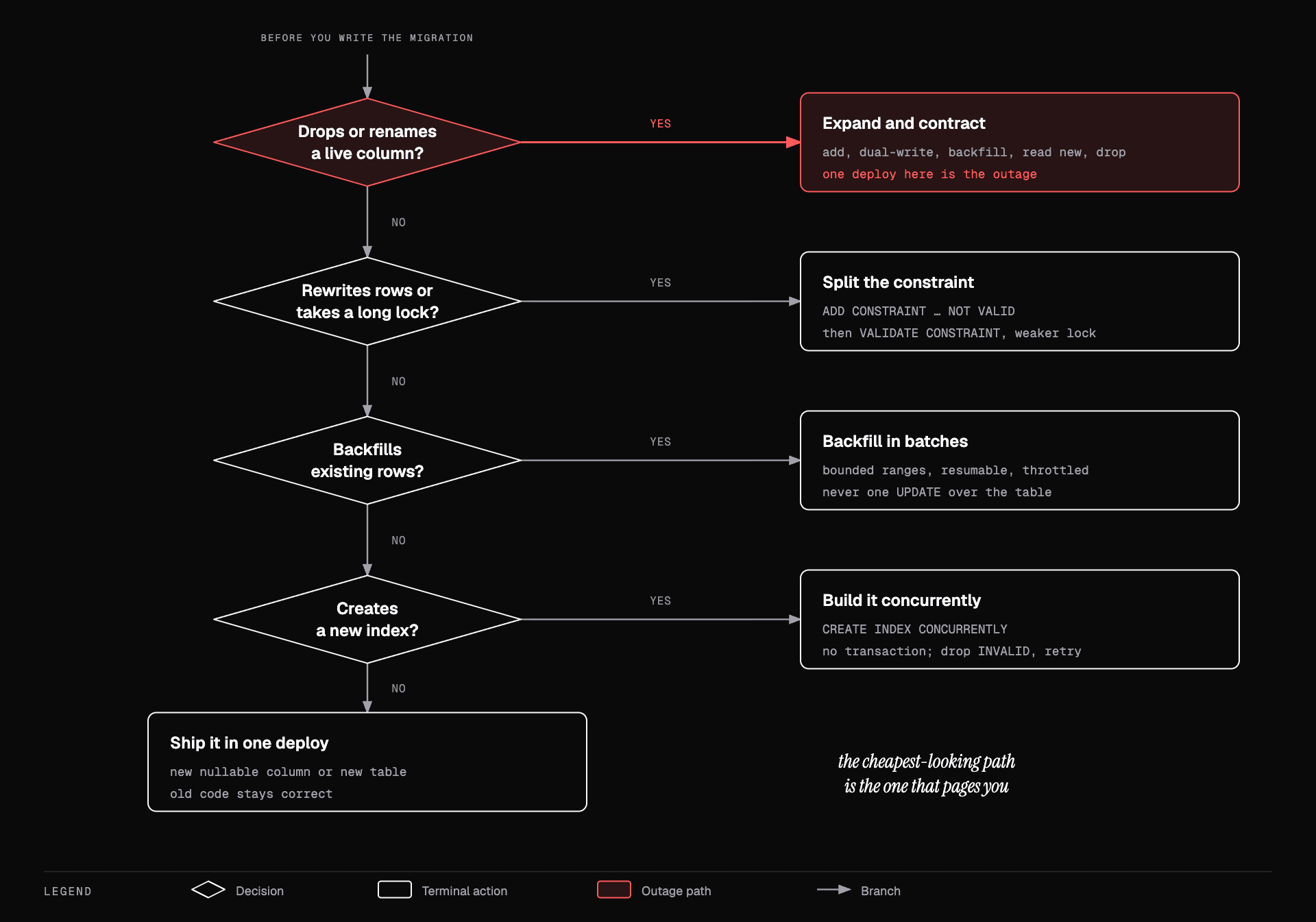
Four questions, in order:
- Is it purely additive? New table, new nullable column, new index. Ship it — but if it
is an index,
CONCURRENTLYand outside a transaction. - Does it need a long lock or a table rewrite? Type changes,
NOT NULL, validated constraints. Split intoNOT VALIDplusVALIDATE, or into expand/contract. - Does it touch existing rows? Batched, resumable, throttled backfill. Never one statement.
- Does it remove or rename something the running code uses? Never one deploy. Expand/contract, with a rollback window between the last read switch and the drop.
Migration tooling discipline
Versioned, ordered, immutable. Once a migration has run anywhere beyond your laptop, it is history. Fix it with a new migration; never edit the file.
One logical change per migration. Easier to review, and when something fails at 3am you know exactly what was in flight.
Forward-only in production. Write the down migration if your tool wants one, but do
not plan to use it. Real recovery is a new forward migration plus a code rollback, because
the down path is never tested against production data.
Separate schema migrations from data migrations. Schema DDL is fast and transactional; backfills are long-running and need throttling and resumability. Running them through the same mechanism means your deploy pipeline blocks for an hour.
Review migrations like security code. A migration is the one artifact where a five-character mistake is unrecoverable.
Rollback planning
Ask, before writing the migration: if I have to go back one version an hour from now, what breaks?
- Additive change, code rolled back — fine. The new column sits unused.
- Dropped column, code rolled back — broken. Old code queries a column that is gone. This is why the drop waits.
- Backfilled data, code rolled back — usually fine, as long as the old code tolerates the new values.
Backups are not a rollback plan for a bad migration. Restoring loses every write since the backup. Point-in-time recovery narrows that to seconds, and only if you have tested a restore. An untested backup is a hypothesis.
Testing migrations
Running a migration against an empty dev database proves the syntax and nothing else. What you actually need to know is how long it takes and what it locks at production scale.
- Restore a production-size copy (anonymised) and time it there.
- Assert that the previous application version still passes its tests against the new schema — that is the expand/contract invariant, and it is mechanically checkable.
- In staging, run the migration while load is running. A migration tested against an idle database has not been tested against locks.
Watching the rollout
During and right after:
- Lock waits —
pg_stat_activityfiltered onwait_event_type = 'Lock'. - Replication lag — the first thing a backfill breaks.
- Error rate by version — if old and new instances are both live, you need to know which one is failing.
- Invalid indexes — after any
CONCURRENTLYbuild.
Decide the abort condition before you start. "Roll back if error rate exceeds 1% for two minutes" is a plan; "keep an eye on it" is not.
Practice
You add a column and run ALTER TABLE orders ADD COLUMN x text;. It hangs. Why, and what do you do?
It is waiting for ACCESS EXCLUSIVE, blocked by an open transaction holding a lock on the
table. Worse, every query arriving after it is now queued behind it. Cancel it immediately,
find the blocker with pg_blocking_pids, then retry with lock_timeout set.
Why can't CREATE INDEX CONCURRENTLY run inside a transaction?
It needs multiple passes over the table with commits in between so that concurrent writes stay visible to it. That also means a failure leaves a partially built, invalid index that you must drop explicitly.
A rename shipped as one migration plus one deploy. What is the window of breakage?
From the moment the migration commits until the last old instance is replaced. During a rolling deploy, old instances are still serving traffic and querying a column that no longer exists. Every one of their requests fails.
Your backfill has been running for 40 minutes and replication lag is climbing. What now?
Stop it. It is resumable by design, so nothing is lost. Reduce the batch size, increase the pause, and restart. Lag is a read-availability problem and it affects users who are not involved in your migration at all.
Why write the NOT VALID constraint first instead of just validating up front?
NOT VALID is instant and immediately protects against new bad rows, while VALIDATE
does the slow scan under a lock that does not block reads or writes. Splitting them turns
one long hard-locked operation into one instant operation plus one background one.
Recall checklist
- State the rollback invariant in one sentence
- The five steps of expand/contract, in order, and which one is irreversible
- Why the drop goes in a separate deploy days later
- What DDL and DML each mean, and which one your application runs all day
- Name the six table lock modes and the statement that takes each
- Why
ROW EXCLUSIVEdoes not conflict with itself - Which lock
ALTER TABLEtakes and what it conflicts with - Why a waiting
ALTERblocks queries that would not have conflicted - What
lock_timeoutbuys you, and what it needs to be paired with - Why
ADD COLUMN ... DEFAULT 'x'is cheap butDEFAULT now()is not - The three-step safe path to
NOT NULL - Three consequences of
CREATE INDEX CONCURRENTLY - How to find and clean up an invalid index
- Why
NOT VALIDthenVALIDATEbeats a single validated constraint - Four properties a good backfill loop has
- Why
SKIP LOCKEDbelongs in a backfill - Why forward-only beats
downmigrations in production - Why a backup is not a rollback plan, and what is
- Two things staging must do that an empty dev database cannot
- Four signals to watch during a rollout, and why you set the abort condition first